Project Overview
I built an appointment booking and reminder workflow inside GoHighLevel for a business that needed a cleaner way to manage booked calls, confirmations, reminders, no-shows, and post-appointment follow-up.
Booking an appointment is only one part of the process. The real problem starts after the booking happens.
The lead needs confirmation. The team needs context. The appointment needs reminders. If the lead does not show up, the system needs a recovery path. If the appointment is completed, the system needs the next follow-up step.
This workflow was built to manage that entire process inside GoHighLevel.
The Problem
The business had appointment bookings, but the process after booking was not fully organized.
Some leads booked calls and forgot. Some needed reminders. Some did not show up. Some completed the appointment but did not receive the right follow-up afterward.
The team also needed better internal preparation before each call.
The main problems were:
Manual appointment confirmations
Weak reminder process
No clear no-show recovery workflow
No internal prep notes for the team
No automatic follow-up based on appointment status
Less visibility inside the pipeline
This created extra work for the team and made the appointment process less reliable.
The Solution
I built a calendar-triggered appointment workflow inside GoHighLevel.
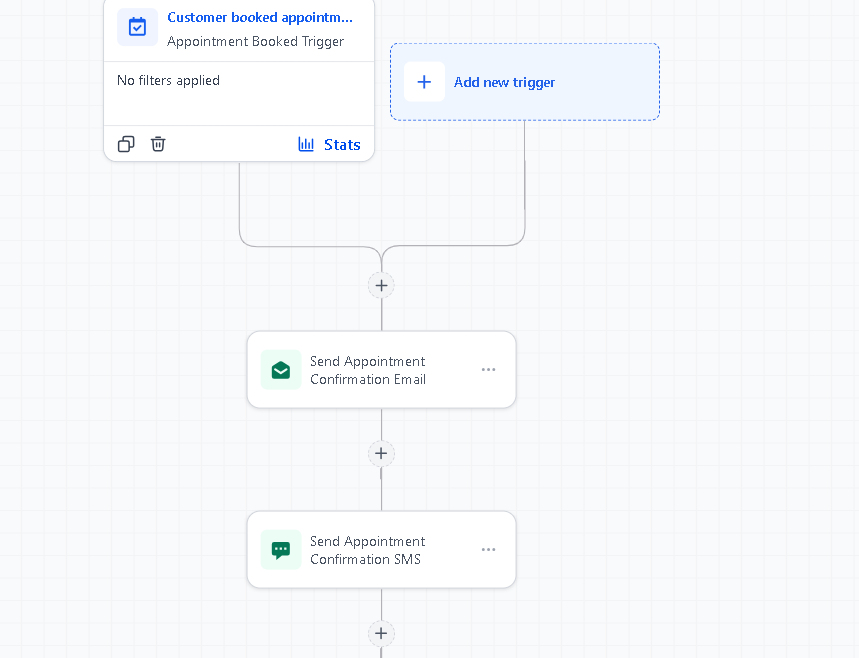
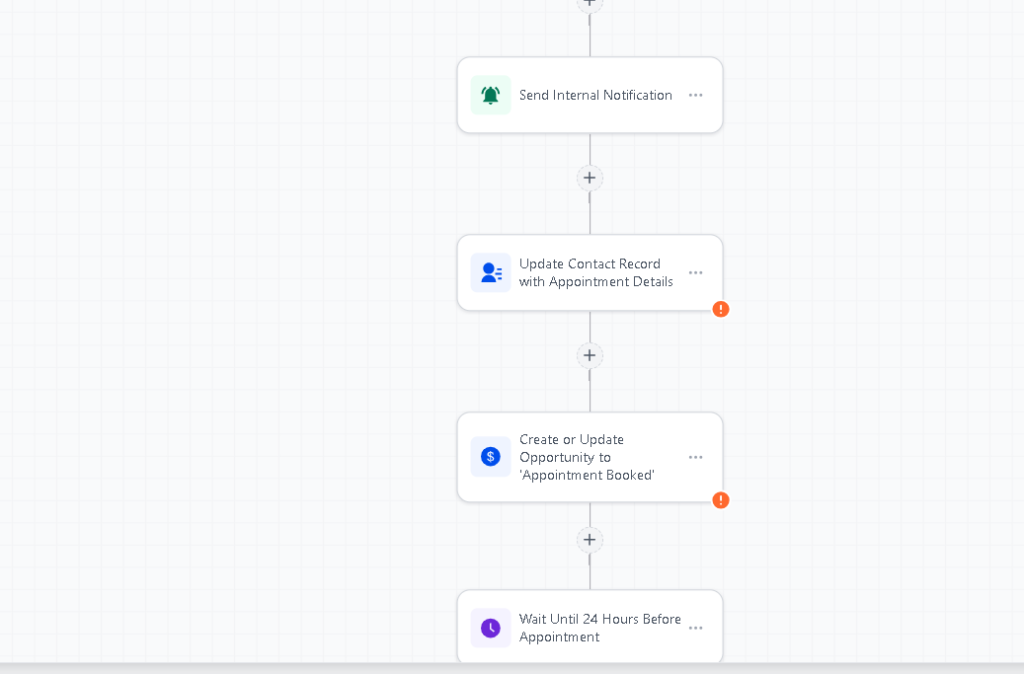
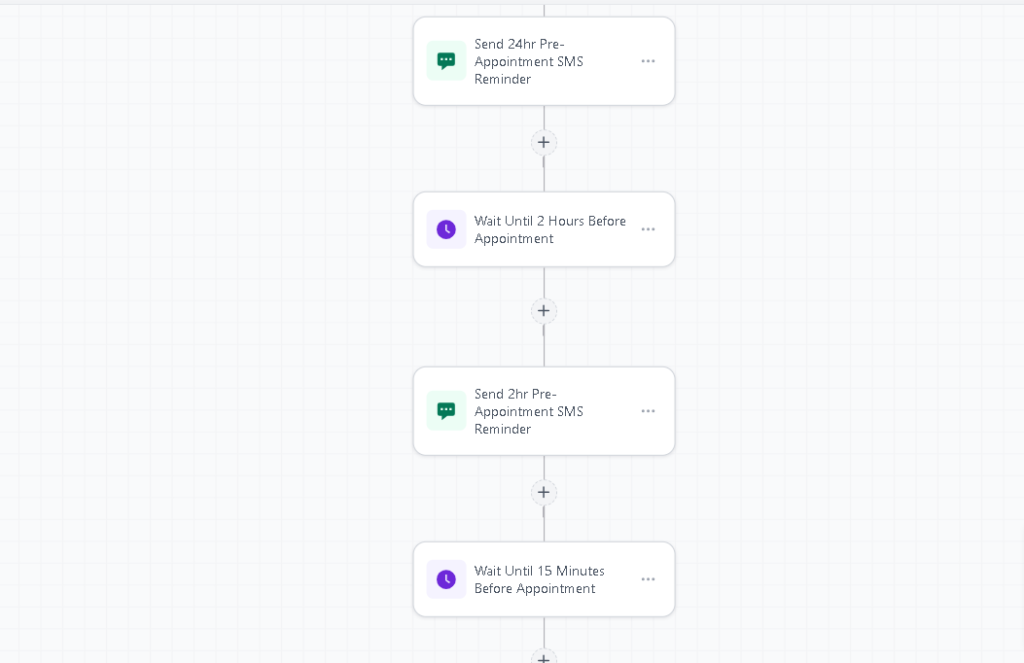
When a lead books an appointment, the system sends an instant confirmation, schedules reminder messages, updates the CRM, and prepares the team with internal notes. After the appointment, the workflow changes based on the appointment outcome.
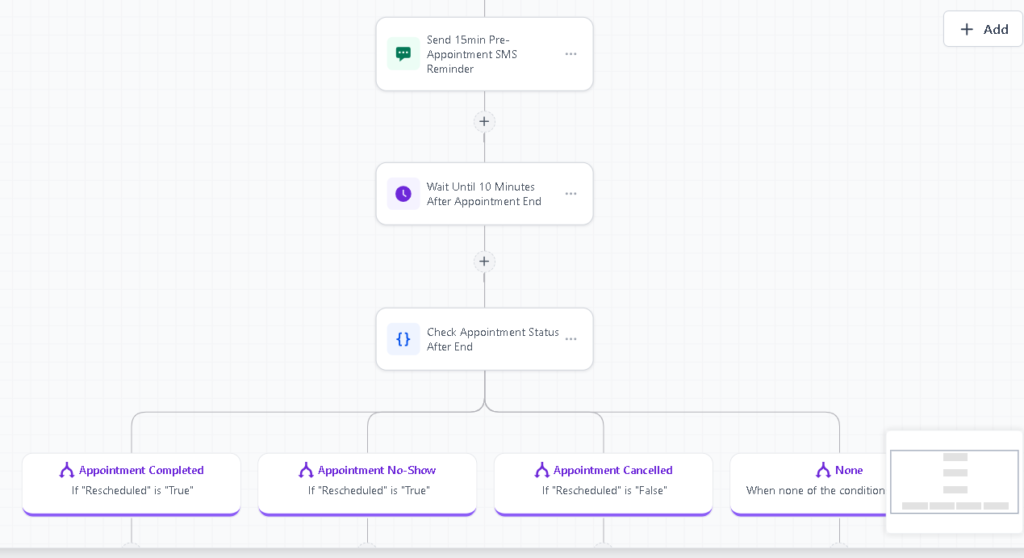
If the appointment is completed, the contact can move to the next sales or follow-up stage.
If the lead does not show up, the system can trigger a no-show recovery path.
Workflow Logic
A lead books an appointment through the calendar.
GoHighLevel triggers the appointment workflow.
The lead receives an instant email confirmation.
The lead receives SMS reminders before the appointment.
The team receives internal appointment details.
The contact record is updated inside the CRM.
The system waits for the appointment status.
If the appointment is completed, the lead moves to the next step.
If the lead is marked as no-show, the no-show follow-up workflow begins.
The contact remains organized inside the pipeline.
Tools Used
GoHighLevel Calendars
GHL Workflows
Appointment Triggers
Email Confirmation
SMS Reminders
Custom Fields
Dynamic Merge Fields
Internal Notifications
Pipeline Updates
No-Show Follow-Up Logic
What I Focused On
The goal was to make the booking process easier for both the lead and the team.
For the lead, the workflow needed to provide clear confirmation and reminders.
For the team, the workflow needed to provide appointment context and a cleaner CRM record.
For the business, the workflow needed to reduce no-shows and prevent missed follow-up after the call.
I focused on keeping the automation simple, reliable, and easy to understand.
Business Impact
The system made the appointment process more organized from booking to follow-up.
Instead of manually sending reminders or checking who did not show up, the team had a workflow that handled the process automatically.
Key outcomes:
Instant booking confirmation
Automated SMS reminders
Better team preparation
Cleaner appointment tracking
No-show recovery process
Reduced manual follow-up
Better pipeline movement after calls
Booking
Confirmation
Reminder
Appointment Status
Completed / No-Show Follow-Up
Example SMS:
Hi [Name], quick reminder for your appointment tomorrow at [Time]. Reply if you need to reschedule.
If your business books calls but struggles with reminders, no-shows, or messy appointment follow-up, this workflow can make the process cleaner.
Book a 20-minute strategy call:
Great content! Keep up the good work!